

What does the Advantage+ image-text rewrite actually do?
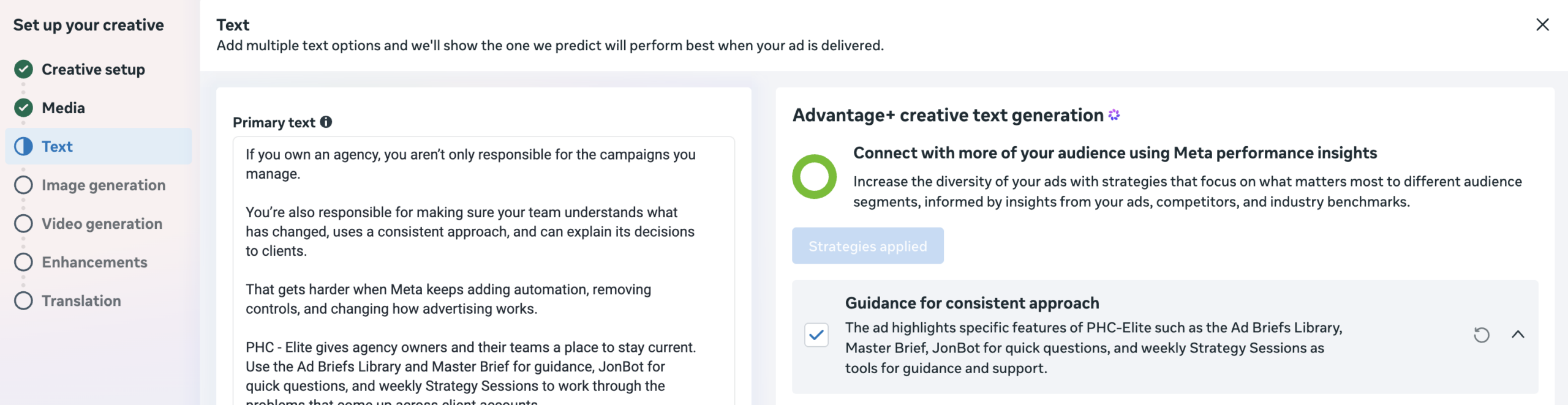
In the documented workflow, Meta used an advertiser's uploaded image as a template and generated new image options that replaced its main headline. This is different from rewriting the separate Primary text or Headline fields below an ad.
Jon Loomer's July 28 account walkthrough showed eight image alternatives across three messaging angles. In his examples, Meta changed the main headline while keeping the other text, font styles, colours, banner and formatting intact. The new in-image headline also aligned with generated copy options associated with the same angle.
Your uploaded image
The original static graphic provides the layout, type treatment and surrounding visual system.
A new main headline
The observed feature swaps the headline words while trying to preserve the rest of the design.
Selectable options
The generated images can be reviewed and individually deselected before they remain in rotation.
What the evidence does not prove
The available evidence does not establish a universal, silent rewrite of every eligible ad image. It shows a specific updated Ads Manager workflow with generated options. Meta has not published a dedicated product note describing account eligibility, rollout coverage, the underlying image-reading method or a platform-wide default.
| Claim | Evidence status | Safe interpretation |
|---|---|---|
| Meta can change headline text inside an uploaded image | Confirmed in a first-hand account example. | Treat baked-in text as potentially variable when the option appears. |
| Every account has the feature | Not confirmed. | Inspect each account and creative workflow rather than assuming availability. |
| All variants publish without review | Not established by the source. | Generated options appeared selected, but advertisers could deselect them. |
| Meta uses OCR to perform the swap | The internal method is not disclosed. | Describe the observable outcome, not an undocumented technical mechanism. |
| Muse Image powers this feature | Not confirmed. | Keep the text-swap workflow separate from Muse unless Meta attributes it. |
Do not confuse observation with rollout policy
Meta product interfaces frequently roll out unevenly. Preserve screenshots of the options shown in your own account, including which variants are selected, instead of relying on a generic checklist alone.
How the Branding section helps—and where it stops
Ads Manager's Branding controls can give Meta better inputs, but they do not turn generated copy into pre-approved copy. Loomer found the Branding section in the Identity area and documented fields for logo, brand font, colours, text tone, visual style and restricted words.
Those settings are worth completing when an account uses AI-generated text or imagery. They reduce ambiguity and give the system a defined brand vocabulary. But Loomer also reported occasional emojis he did not want and words that appeared despite being on his Restricted Words list.
| Branding input | What it can guide | What it cannot guarantee |
|---|---|---|
| Logo and visual style | Recognition and overall creative direction. | Pixel-perfect compliance across every generated asset. |
| Brand font and colours | Familiar typography and palette choices. | Correct hierarchy, spacing or readability in every placement. |
| Text tone | Preferred voice and messaging character. | Legally accurate claims, offer terms or required disclosures. |
| Restricted words | Words and phrases the generator should avoid. | Perfect enforcement; the documented account showed exceptions. |
Why baked-in copy is now a governance risk
The design can look approved while the claim inside it is not. That is the practical danger. A familiar font, colour system and product image can make a generated variant feel safe even when its words change the offer, audience, guarantee or compliance meaning.
The highest-risk creative includes prices, percentage discounts, deadlines, availability claims, financing language, regulated product claims, contest terms, testimonials, superlatives and mandatory disclaimers. A headline that no longer matches the landing page can also create a measurement problem: the ad may earn clicks through a promise the destination does not support.
How to review or remove image-text variants
The demonstrated control is variant-level review and deselection. Loomer says advertisers can unselect images they do not want. That is more precise than describing an undocumented universal “image-text enhancement” toggle.
Open the ad-level Text workflow
Look for Advantage+ Creative Text Generation beside the Primary text and Headline options. The interface may differ across accounts.
Inspect every generated angle
Open each angle and review the image, Primary text and headline together. A safe image headline can still conflict with its paired copy.
Deselect anything outside approval
Remove generated images and copy options that change the offer, audience, tone, legal meaning or landing-page promise.
Complete Branding under Identity
Add the correct logo, font, colours, tone, visual style and restricted words—but treat them as guidance, not final approval.
Save the evidence
Capture the selected variants and final preview for the campaign change log so teams can explain what was permitted to run.
A five-step agency audit for text-bearing images
Audit by claim sensitivity, not simply by campaign spend. A low-spend regulated ad can create more risk than a high-spend generic product image.
| Audit step | Question | Required evidence |
|---|---|---|
| 1. Inventory | Which active images contain claims or offers? | Creative export grouped by promotion, market and approval owner. |
| 2. Account check | Which accounts show text-in-image options? | Dated screenshot of the ad-level Text workflow. |
| 3. Brand controls | Are Branding fields current? | Approved logo, font, palette, tone and restricted-word list. |
| 4. Variant review | Does every selected option match the landing page? | Saved preview and offer/disclosure comparison. |
| 5. Monitoring | What actually served and performed? | Placement previews, comments, screenshots and downstream quality signals. |
Is this the same as Muse Image?
Not based on currently published evidence. Meta's July 7 Muse Image announcement said the model would come to Advantage+ Creative in the following weeks and highlighted improved text rendering inside generated visuals. But neither Meta's announcement nor Loomer's report attributes the observed headline-swap feature to Muse Image.
The safest editorial position is to describe the feature by what appeared in Ads Manager, without assigning an underlying model Meta has not named.
Frequently asked questions
Can Meta rewrite text that is baked into an ad image?
Yes. A documented Advantage+ Creative Text Generation workflow used an uploaded image as a template and generated new image options with alternate main-headline text while preserving the surrounding font, colours and formatting in that example.
Is Meta's image-text rewriting active in every ad account?
A universal rollout is not confirmed. The feature was documented first-hand in one Ads Manager workflow, and availability may vary by account, campaign, market or rollout stage.
How can advertisers stop an unwanted text-in-image variant?
Review the generated Advantage+ Creative Text Generation options and deselect any image or copy variant that should not enter rotation. For regulated or contractually approved creative, keep generated variants out unless each one has been reviewed.
Do Meta's Branding settings guarantee compliant AI copy?
No. Branding can guide generated creative with a logo, brand font, colours, text tone, visual style and restricted words, but the documented account owner reported that restricted words and style preferences were not always followed strictly.
Is Muse Image powering the Advantage+ text-in-image rewrite?
That attribution is not confirmed. Meta announced that Muse Image would come to Advantage+ Creative, but neither Meta nor the first-hand feature report identified Muse Image as the system behind these headline variants.
The operational takeaway
Baked-in text is no longer automatically fixed just because it is part of an image file. When Advantage+ surfaces generated image options, treat the words inside each version as copy that requires the same review as the Primary text, Headline and landing page.
Complete Branding, but do not mistake guidance for governance. The reliable control is a documented review process: inspect, compare, deselect and preserve evidence of the final variants allowed into rotation.
Related reading and tools
Primary Sources Checked
Evidence standard: The text-in-image workflow is grounded in Jon Loomer's first-hand Ads Manager documentation. Meta's newsroom supports the surrounding Muse Image timeline but does not confirm that Muse powers this feature.
- Jon Loomer Digital — Meta Can Now Rewrite the Text on Your Ad Images, July 28, 2026
- Meta Newsroom — Introducing Muse Image, July 7, 2026
Reviewed August 25, 2026. Advantage+ Creative availability, labels and controls can change by account and rollout stage; verify the current ad-level workflow before publishing.
Review the ad people may actually see
Use the Meta Ad Previewer to check message hierarchy and placement fit before generated options enter rotation.
Open the Meta Ad Previewer