
2026 Click-Worthy Title Playbook
Titles win when they promise a real point of view, stay readable in pixels, and survive the AI-heavy SERP around them.
Write titles that offer a unique point of view or firsthand insight, not generic list content.
Use the pixel meter, not a character count, to avoid truncation on desktop and mobile.
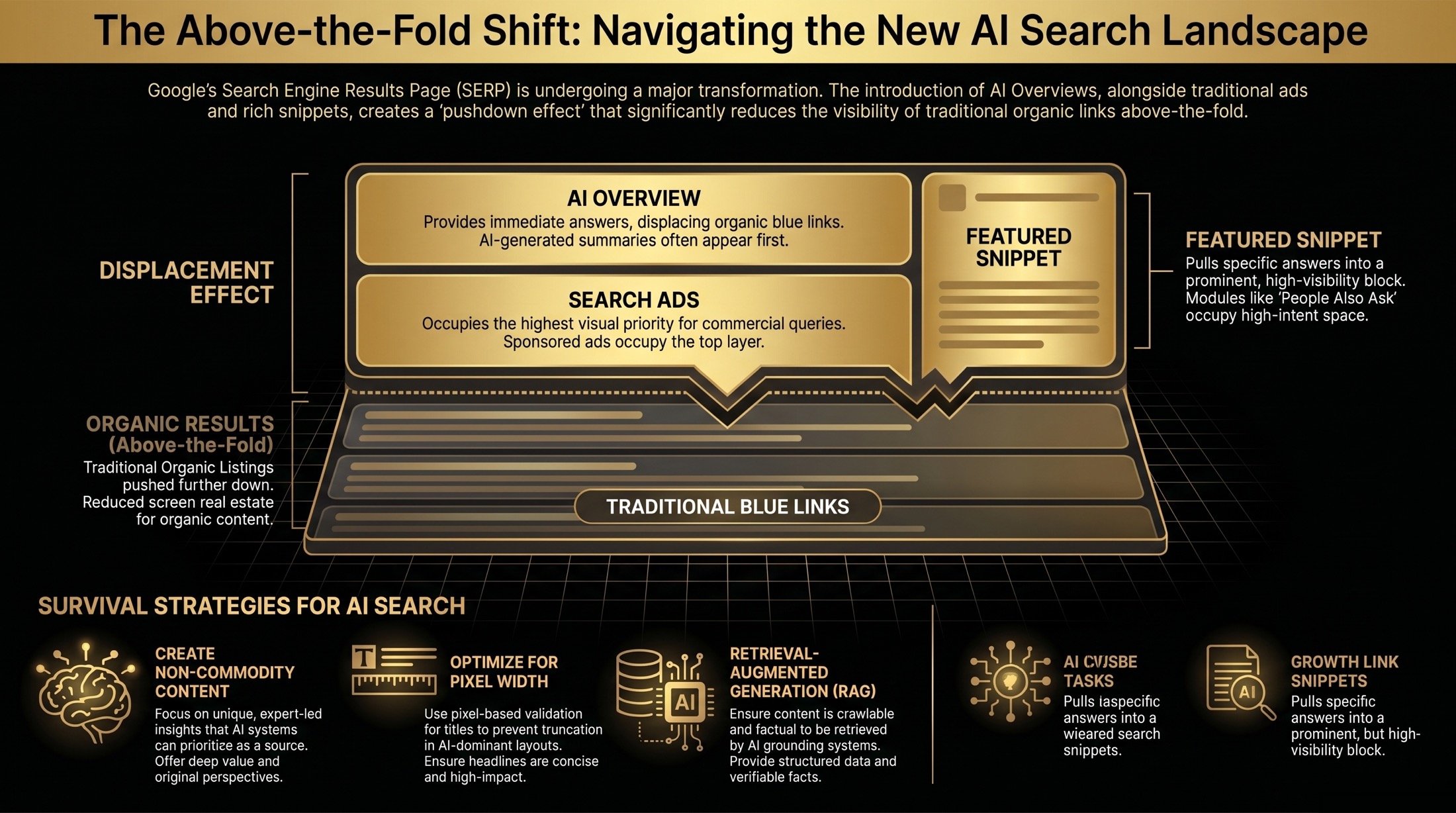
Test titles against AI Overviews, ads, featured snippets, and People Also Ask blocks.
Practical SERP Pixel Width Guidelines
| Element | Desktop | Mobile | |
|---|---|---|---|
| Title Tag | 600px | 805px | 560px |
| Meta Description | 920px | 680px | 920px |
How to Use the SERP Simulator Tool
- Fetch or paste metadata inputs.
- Set target bolded keywords to test truncation risk.
- Toggle desktop, mobile, or PDF context.
- Enable search-focused SERP features such as AI Overview pushdown, ads, featured snippets, sitelinks, People Also Ask, ratings, and dates.
- Export validated tags and snippet visuals.
These are practical QA thresholds, not a guarantee of exactly how Google will display every result. Use them to guide meta title previews, meta description previews, and client approvals before publishing.
What SERP Features Can This Tool Simulate?
Most SERP preview tools stop at a title tag, URL, and meta description. That is useful, but it misses the real screen your audience sees. Modern Google results can include ads above organic listings, AI Overviews, featured snippets, People Also Ask questions, sitelinks, dates, ratings, and rich attributes.
This simulator focuses on the practical QA layer: how much visual space your organic result has, which surrounding search modules might push it down, and whether your page is structured clearly enough to deserve a richer search appearance. Modules that need real inventory or location data, such as local packs, image packs, shopping, and video carousels, are better audited with live SERP checks or specialist tools.
| SERP feature | What it changes | How to prepare content |
|---|---|---|
| Search ads | Push organic listings lower and change above-the-fold visibility. | Compare organic messaging against paid intent and keep landing page promises consistent. |
| AI Overview | Can answer the query before traditional listings appear. | Use concise definitions, clear entity relationships, original examples, and source-worthy sections. |
| Featured snippet | Pulls a short answer, list, or table into a prominent result block. | Answer the query directly near the top of the page, then expand with detail underneath. |
| People Also Ask | Adds expandable related questions inside the SERP. | Write clean question-led headings with short answers that can stand alone. |
| Sitelinks | Adds extra links under a text result, often improving scan depth. | Use clear internal navigation, descriptive headings, and logical page architecture. |
| Ratings and dates | Adds trust cues or freshness cues inside the organic snippet. | Keep review, article, and date signals honest, visible, and consistent on the page. |
Why Google Truncates by Pixels Instead of Characters
Google renders snippets using proportional fonts, where each character consumes different horizontal space. Pixel-based validation is required for accurate truncation forecasting.
Optimizing for AI Overviews and Generative Search
Concise, intent-aligned metadata improves the chance that a page is understood as a useful source for AI-generated answers and overview modules. For content team QA, that usually means checking title length, snippet clarity, entity coverage, byline dates, original examples, and whether each section answers a real query without forcing Google to infer the point.
How to Think About Live SERP Replication
It is technically possible to build tools that fetch and render live SERP data from third-party APIs, but that is a different product: it requires rank-tracking data, location/device settings, ongoing SERP parsing, and careful legal and platform compliance. For a free client-side simulator, the better version is a stable mock environment that helps teams pressure-test how their snippet behaves beside common SERP features.
That is why this tool lets you toggle realistic SERP modules instead of promising an exact live Google copy. Use it for planning, screenshots, stakeholder education, and content QA. Use Search Console, rank trackers, and manual spot checks to verify what Google is actually showing for a specific query.
Why This Matters for SEO QA
The simulator is useful for content team QA, SEO title checks, client approval workflows, and quick validation of desktop and mobile snippet previews. It helps teams compare a clean KPI baseline with what actually appears in the SERP before launch.
Good Reference Sources
For deeper SERP research, compare this simulator against Google Search Central's Visual Elements Gallery, Google's structured data gallery, and Semrush's SERP explanation guide. The practical pattern is simple: Google controls the final layout, but you can improve eligibility and click quality with clearer metadata, structured content, useful media, and better page architecture.
Frequently Asked Questions
What is the optimal mobile title width in 2026?
Most tools target 805px as a practical upper bound for mobile title rendering.
Do meta descriptions affect ranking directly?
Not directly as a standalone ranking factor, but they strongly influence CTR and relevance signals from user behavior.
Do bolded query matches change truncation risk?
Yes. Bold styling increases rendered width, which can push near-limit snippets into truncation.
Can this tool show a live Google SERP?
No. It simulates common SERP layouts for QA. Live SERP replication is better handled through compliant rank-tracking tools or APIs because results change by location, device, language, personalization, and time.
Which SERP features should I test first?
Start with AI Overview pushdown, ads, People Also Ask, featured snippets, and sitelinks. Those are the features most likely to change above-the-fold visibility for informational and commercial searches.