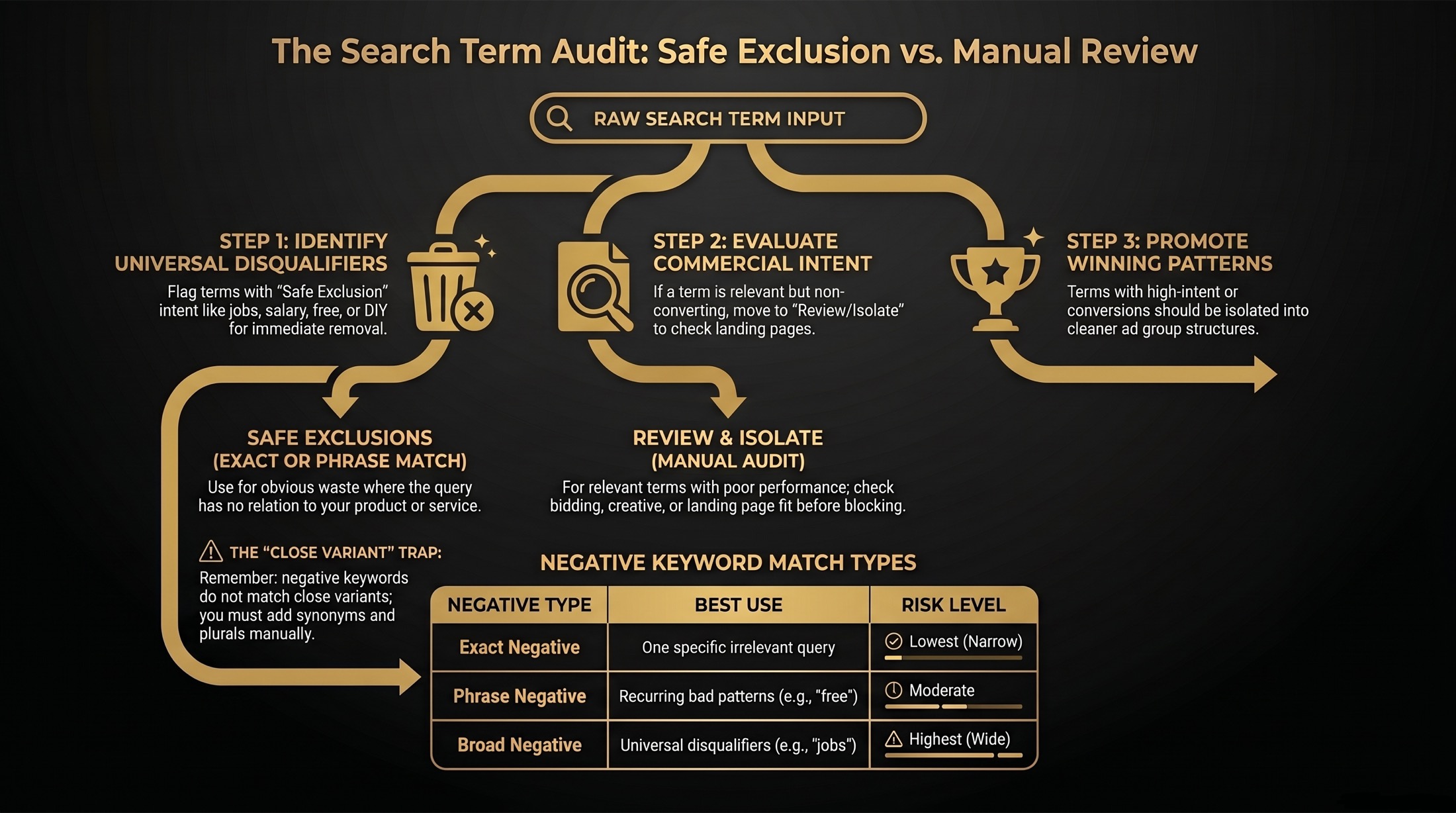
How to Use the Search Terms Waste Analyzer
Export or copy your Google Ads Search Terms Report, paste it into the tool, choose your business model and report context, then set practical review thresholds for CPA, ROAS, spend, and clicks. The analyzer separates safe exclusion candidates from commercial queries that should be reviewed, isolated, or promoted into stronger account themes.
Use this as the weekly search-query hygiene layer beside the Google Ads data retention export checklist, Attributed Branded Searches, and Conversion Lift. Search terms show what demand you captured; lift and branded-search reporting help explain what demand you created.
What to Export from Google Ads
The minimum fields are Search term and Cost. For stronger recommendations, include clicks, impressions, conversions, conversion value, campaign, ad group, keyword, and match type. Google describes the Search Terms Report as the place to review actual searches that triggered ads, and it can be used to find negative keyword ideas.
Official references: Google Ads Search Terms Report and negative keyword ideas from search terms.
How to Decide What to Exclude
Obvious irrelevance
Use this for terms that clearly do not match your offer, such as jobs, salary, free, DIY, template, or unrelated product searches.
Relevant but not converting
Keep buying, selling, competitor, product-specific, and local-intent queries in review when they spend but still look commercially valuable.
Do not block future demand
Broad negatives can overreach, so the goal is to protect qualified traffic while you fix landing page fit, bidding, or creative issues.
How the Waste Score Works
The waste score is rule-based. It weighs spend pressure, click pressure, zero-conversion behavior, CPA or ROAS gaps, disqualifying intent words, and match-risk signals. Brand-protected terms and converting terms are handled conservatively so the tool does not push risky exclusions. When a ROAS target is entered but the export does not include conversion value or ROAS, the tool skips ROAS scoring and shows a data-quality notice.
Why Zero Conversions Do Not Always Mean Waste
A search term can spend money without converting and still be commercially important. If the query shows buying, selling, local, competitor, or product-specific intent, the real issue may be landing page fit, bidding alignment, audience mismatch, or ad copy rather than bad traffic.
The analyzer keeps those terms in Review / Isolate by default so you can inspect the funnel before excluding future qualified demand. That is especially important when a query is close to a converting theme or when it may represent a broader pattern rather than a one-off bad click.
Negative Keyword Match Types Explained
| Negative Type | Best Use | Risk |
|---|---|---|
| Exact negative | One specific irrelevant query. | Lowest risk, but narrow coverage. |
| Phrase negative | Recurring bad phrase patterns such as job-seeking or free-resource intent. | Moderate risk if the phrase also appears in qualified searches. |
| Broad negative | Clear universal disqualifiers such as jobs, career, salary, or reddit. | Highest risk because it can block many query variations. |
Google notes that negative keyword match types do not behave exactly like positive keyword match types, so every suggested negative should be reviewed before upload. Source: Google negative keyword match types.
The Risks of Negative Keywords
Negative keywords are necessary for stopping obvious waste, but they can also block future qualified searches if they are applied too broadly. Broad match negatives carry the highest risk because they act like universal disqualifiers, and too many negatives can reduce reach faster than expected.
They also do not behave like positive keywords. Negative keywords do not expand the same way close variants do, so you may need to add singular, plural, and synonym versions manually if you want full coverage.
Search Terms Report vs Search Terms Insights
The Search Terms Report is row-level query evidence for Search campaigns and other eligible traffic. Search terms insights group query themes and are especially useful when evaluating Performance Max or broader campaign types. Use both when available: reports help with precise exclusions, while insights help explain demand themes.
Performance Max Caveats
Performance Max search term visibility is more aggregated than classic Search query review. Treat PMax terms as directional evidence for account structure, creative, asset groups, query exclusions, and landing-page fit. In Performance Max context, this tool uses safer labels such as query exclusion candidate and review / isolate because a visible term may represent a broader query theme rather than a simple keyword-to-query relationship.
Official reference: Google Performance Max search impact and results.
Common Waste Patterns by Industry
Lead generation and B2B accounts often waste spend on jobs, salary, course, definition, and template searches. Local services often see DIY, parts, free, and near-me queries with weak intent. Ecommerce teams should review coupon, used, manual, and return-related searches carefully because some can be low-quality but others may still convert.
How Often to Review Search Terms
Review search terms weekly during launches and budget increases. Mature accounts can usually move to a biweekly or monthly cadence, with extra reviews after landing page changes, bidding strategy changes, or major seasonality shifts.
Frequently Asked Questions
How do I find wasted spend in Google Ads?
Start with the Search Terms Report, sort by cost, then review queries with meaningful spend or clicks and no conversions. Compare converting queries against target CPA or ROAS before excluding anything.
What is the difference between a search term and a keyword?
A keyword is what you bid on. A search term is the actual query someone typed or spoke before your ad was eligible to show.
Can adding negative keywords hurt performance?
Yes. A negative keyword can block future qualified searches if it is too broad or if it overlaps with a converting theme. That is why this tool labels recommendations as review items instead of automatic changes.
Is this tool ready for AI search and answer engines?
The page keeps definitions, formulas, source links, and tool logic in crawlable static HTML. Google's own AI search guidance says strong crawlable content, useful structure, and clear source-backed explanations remain the foundation for AI search visibility. Source: Google AI search optimization guidance.