
June 1, 2026 Readiness Note
As of May 31, 2026, this should be treated as a live-readiness project, not a theoretical policy update. Before June 1, audit any "all time" Looker Studio reports, Supermetrics pulls, Google Ads API jobs, and billing-history exports that depend on account data older than 132 months. After the policy window starts, your safest source of truth for legacy analysis is your own warehouse or exported archive.
For a durable implementation, use the companion guide to export Google Ads data to BigQuery or PostgreSQL. It covers stable IDs, deleted and paused campaigns, history snapshots, refresh cadence and reconciliation.
What is the New Google Ads Data Retention Policy?
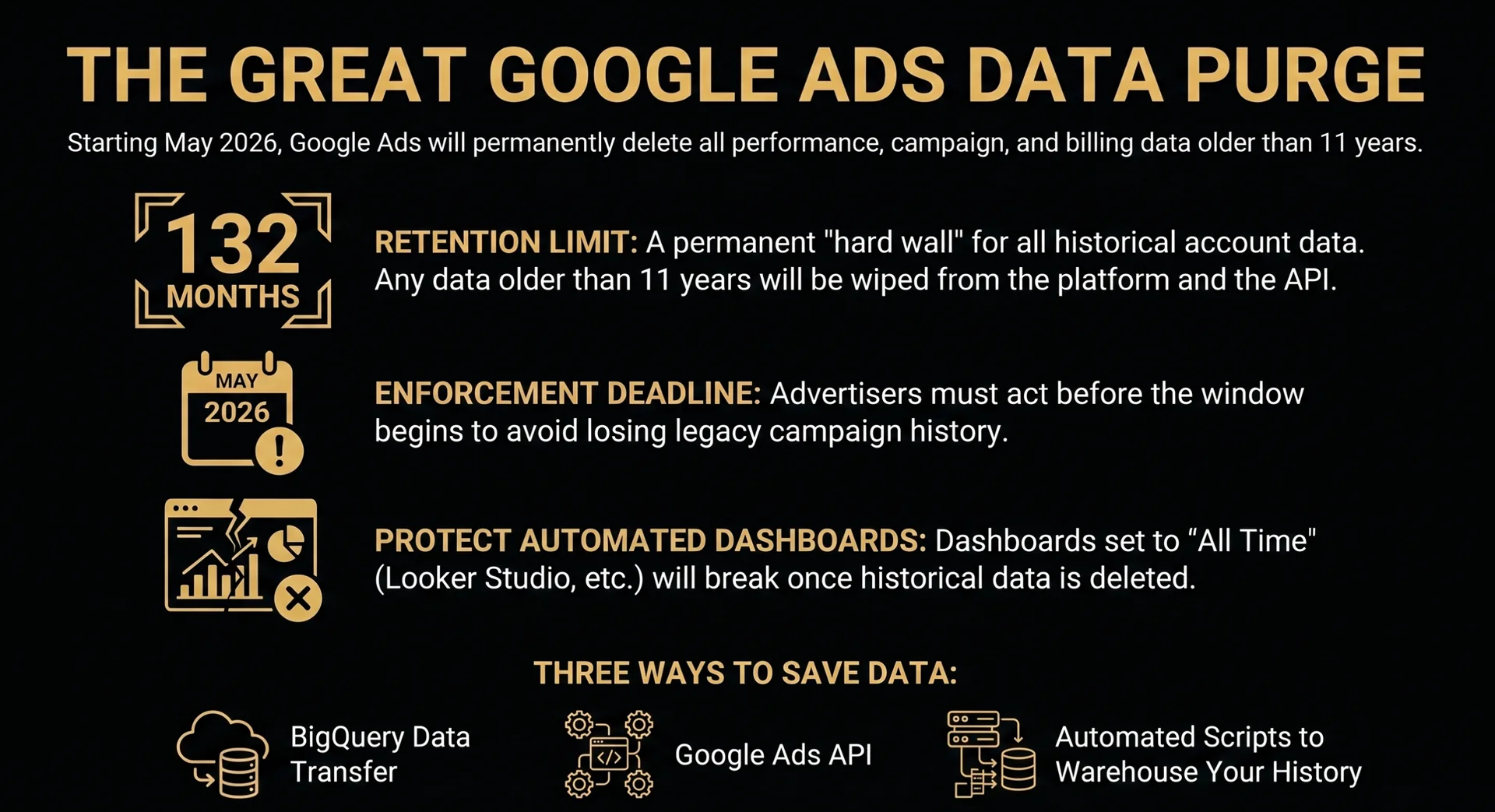
Google has officially announced a new data retention limit for Google Ads accounts, restricting access to historical reporting data to a maximum of 11 years. Once the enforcement window begins, any performance data, campaign metrics, or billing history older than 132 months will be permanently deleted from the platform and the API.
Why is Google Making This Change?
While 11 years sounds like a lifetime in digital marketing, this is a massive shift for enterprise brands, legacy SaaS companies, and long-standing agencies. Google is likely executing this purge for two reasons:
- Infrastructure Costs: Storing petabytes of granular search query data from 2012 is a massive, unnecessary server load.
- Privacy & Compliance: Global data privacy laws (like GDPR and CCPA) strongly discourage the indefinite storage of user data.
Pipeline Architect Warning
Do not ignore this notification. Even if you don't actively look at 2015 data, your automated third-party reporting dashboards (Looker Studio, Supermetrics, TripleWhale) might break if their API queries are set to "All Time" and suddenly hit a hard data wall.
Who Does This Actually Impact?
For the average local business or e-commerce startup, losing data from a decade ago is irrelevant—the algorithmic landscape (PMax, Smart Bidding) didn't even exist back then.
However, this is critical for:
- Enterprise Accounts: Brands that run multi-decade YoY macro-trend analyses.
- Agencies: Firms that use long-term historical account data to pitch account turnarounds to new clients.
- Data Scientists: Teams feeding raw, historical auction data into proprietary machine-learning models.
How to Back Up Your Historical Data Before the Purge
If you need to preserve your legacy campaign data, you must extract it from the Google Ads ecosystem immediately. Relying on the native UI export button will crash your browser. Here are the three professional ways to export your history:
- 1. BigQuery Data Transfer Service (Recommended): If you are running a serious pipeline, you should already be warehousing your data. Set up a native BigQuery transfer to automatically dump your historical tables into your own Google Cloud environment.
- 2. The Google Ads API: Have your dev team script an API pull specifically targeting the
metricsandsegmentsfields for the years in question. Store this locally or in an AWS bucket. - 3. Automated Scripts: For smaller accounts, you can use Google Ads Scripts to push historical campaign performance directly into Google Sheets, bypassing the UI limitations.
Practical Next Step
If you are exporting historical performance, keep campaign naming and tracking intact. A clean UTM structure, a revenue-aware KPI model, and a weekly GA4/GTM tracking audit make archived media data far more useful once it leaves the Google Ads UI.
What to Check Before June 1
The highest-risk teams are not only the ones with decade-old campaigns. The real risk is any report, automation, or pitch deck that quietly asks Google Ads for a longer historical window than the platform will preserve.
- Looker Studio dashboards: Search for scorecards, blended charts, and comparison periods using "all time" or very long custom ranges.
- API and connector jobs: Confirm that scheduled exports fail gracefully when older months disappear from Google Ads reporting.
- Billing and finance workflows: Export historical spend and invoice context separately from campaign performance data.
- Optimization playbooks: Preserve campaign structure, conversion actions, search-term history, and major account-change notes together so old performance remains explainable.
If you are auditing query quality at the same time, use the Google Ads Search Terms Waste Analyzer to identify expensive search terms and negative keyword candidates before old context gets harder to reconstruct. For cross-channel planning, pair the archive with the GA4 Scenario Planner guide so newer budget models are built on clean inputs instead of stale platform memory.
FAQ: Google Ads Data Retention
When does the Google Ads data retention change matter?
The important planning date is June 1, 2026. Any account that depends on historical Google Ads performance, billing, campaign, or API data older than 11 years should export and document that data before relying on the Google Ads interface.
Will this affect every Google Ads account?
It matters most for long-running accounts, agencies, enterprise advertisers, and analytics teams using multi-year dashboards or API pulls. Smaller accounts may feel little day-to-day impact, but they should still avoid using Google Ads as their only archive.
What should be exported first?
Start with monthly campaign performance, conversion action history, search-term reports, billing records, account change context, and campaign taxonomy. That combination preserves both the numbers and the strategic explanation behind them.
How does this connect to incrementality and Demand Gen measurement?
Historical reporting can show what the platform attributed, but it cannot prove what the ads caused. Pair archived account data with Google Ads Conversion Lift and Attributed Branded Searches to separate old reporting memory from current demand creation.
The Bottom Line
Your data is only your data if you own the database. If you rely entirely on Google’s interface as your source of truth, you are renting your analytics.
More Public Resources
Use the free tools and writing on this site to think through tracking, reporting, and paid media measurement.
Connect on LinkedIn