
Direct Answer
The “AI Max for Search auto upgrade September 1” claim overstates Google's timeline: eligible upgrades begin during September 2026 and are expected to conclude by month-end.
What is actually changing in September 2026?
The September migration applies to two specific legacy Search settings, not to every Search campaign or every campaign containing broad-match keywords.
Google's announcement, updated June 11, 2026, keeps Automatically Created Assets and the campaign-level broad match setting on the September path while moving DSA auto-upgrades to February 2027. The current feature mapping is:
| Existing configuration | Current migration window | AI Max settings enabled | What is not implied |
|---|---|---|---|
| Automatically Created Assets, now called text customization | Begins during September 2026 | Search term matching and text customization | Final URL expansion is not listed as automatically enabled by this mapping. |
| Campaign-level broad match setting | Begins during September 2026 | Search term matching | Merely having broad-match keywords does not make a campaign eligible. |
| Dynamic Search Ads | Begins during February 2027 | Search term matching, text customization and Final URL expansion, with legacy URL controls preserved | DSA is no longer part of the September 2026 auto-upgrade window. |
A campaign containing broad-match keywords is not necessarily using the campaign-level broad match setting. Google's campaign-setting documentation says campaigns whose keywords happen to be broad match, without that setting enabled, are not affected by this upgrade.
Google says advertisers will receive in-account notifications before eligible campaigns transition. Migrated settings will mirror the relevant legacy setup, which means the auto-upgrade does not activate the full AI Max suite in every affected campaign.
New campaigns are a separate change
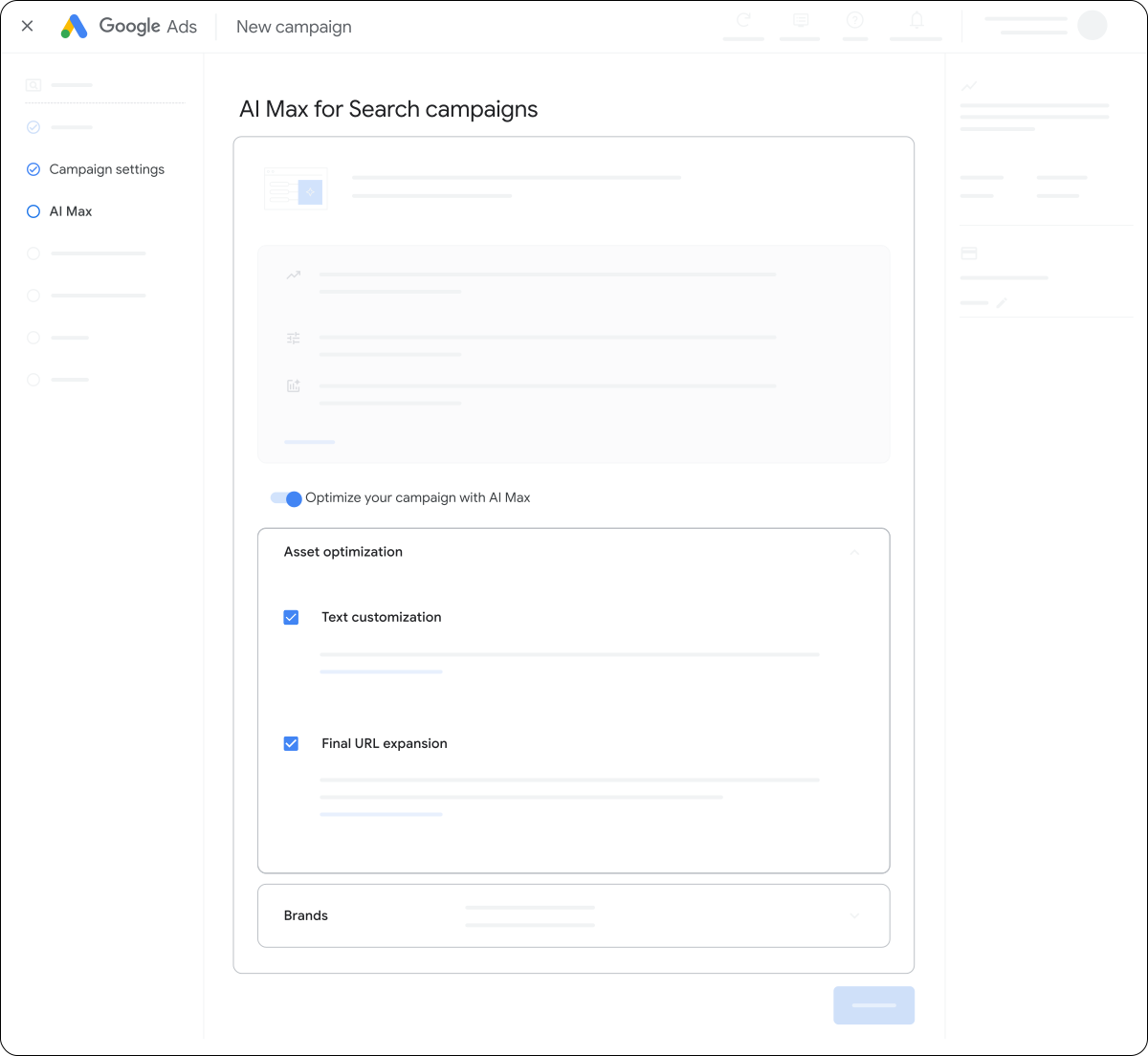
Google's current setup guide says AI Max is selected by default when a new Search campaign is created. That default is separate from the September migration of existing campaigns, and advertisers can review the individual component settings during setup.
What AI Max for Search is—and is not
AI Max is a suite of targeting and asset-optimization controls inside Search campaigns; it is not a new campaign type and does not add Performance Max's cross-channel delivery.
Search term matching
Uses broad-match, asset-based and landing-page-based technology to extend reach through broad-match expansion and keywordless matching.
Text customization
Uses the domain, pages, ads, keywords and assets to generate additional responsive-search-ad headlines and descriptions.
Final URL expansion
Can route a click to another relevant page on the advertiser's domain when Google predicts a better result.
AI Max keeps the Search campaign and ad-group model. Existing negative keywords are respected, while brand, location and URL controls remain available at their documented levels. The later DSA transition is the structural exception: dynamic ad groups will convert to standard ad groups and Dynamic Search Ads to responsive search ads.
Search campaign inventory also needs precise language. AI Max stays within the campaign's existing network settings. If Search Partners are enabled, Search campaigns can already appear on partner placements—including YouTube search results and Watch pages—and partner sites may host image or video ads. AI Max itself adds no Performance-Max-style channel expansion.
Standard Search vs. AI Max for Search vs. Performance Max
AI Max occupies the operating middle ground between manually governed Search and goal-led, cross-channel Performance Max.
| Dimension | Standard Search without AI Max | AI Max for Search | Performance Max |
|---|---|---|---|
| Campaign model | Keyword-led Search campaign | Optimization layer inside a Search campaign | Separate, goal-based campaign type |
| Eligible inventory | Google Search plus Search Partners when enabled | The same Search campaign environment; no automatic PMax-style channel expansion | Cross-channel inventory including Search, Shopping, YouTube, Display, Discover, Gmail and Maps |
| Query discovery | Exact, phrase and broad-match keywords; legacy DSA handled separately | Keywords plus broad-match expansion and keywordless matching informed by assets and landing pages | Search themes, feeds, site content, audience signals and keywordless matching |
| Match-source reporting | UI Source: Keyword; API: ADVERTISER_PROVIDED_KEYWORD |
UI Source: Keyword, AI Max expanded matches, or Landing pages and URL inclusions; API includes AI_MAX_BROAD_MATCH and AI_MAX_KEYWORDLESS |
Search-term insights; API source can be PERFORMANCE_MAX |
| Asset controls | Advertiser-authored RSA assets in this comparison | Text customization and Final URL expansion are campaign-level toggles; Final URL expansion requires text customization | Asset optimization is managed at campaign level; eligible generated assets depend on campaign inputs and settings |
| Negative keywords | Search negatives at supported account, list, campaign and ad-group levels | Existing Search negatives continue to be respected | Account- and campaign-level negatives can apply to eligible Search and Shopping inventory |
| Brand controls | Legacy controls may remain, but current brand management is moving into AI Max | Brand inclusions at campaign or ad-group level; brand exclusions at campaign level | Campaign-level brand exclusions for eligible Search, Shopping and YouTube search inventory |
| Management posture | Maximum manual control | Hybrid automation with Search-level guardrails | Goal-led automation across channels |
Google describes AI Max as a Search optimization layer, while Performance Max is a campaign type designed for Google's broader advertising inventory. Performance Max now also supports campaign-level negative keywords and brand exclusions on eligible search-related inventory, so “PMax has no negatives” is no longer an accurate comparison.
How AI Max makes matching, creative and landing-page decisions
AI Max evaluates keywords, existing creative and website content together, then applies campaign controls before an eligible Search ad candidate enters the auction.
Keywordless matching expands keywords; it does not erase them
Keywordless search targeting identifies relevant queries outside direct advertiser-keyword mappings by learning from campaign keywords, creative, assets, URLs and landing-page content.
Google treats broad-match expansion and keywordless matching as distinct attribution sources. In the Google Ads API, segments.search_term_match_source can identify values such as ADVERTISER_PROVIDED_KEYWORD, AI_MAX_BROAD_MATCH and AI_MAX_KEYWORDLESS. In the web interface, the column is labelled Source, not “Search term match source.”
Search term matching is enabled at campaign level when AI Max is turned on and can then be switched off for individual ad groups. Keywords, match types and standard ad groups remain usable; “keywordless” describes incremental reach, not a keyword purge.
Text customization turns site copy into a media input
Text customization can use the advertiser's domain, landing page, existing ads, keywords and assets to generate additional responsive-search-ad headlines and descriptions.
Google says the feature uses extractive techniques and generative AI. Generated assets can be reviewed and removed individually. That makes website governance part of paid-media governance: obsolete claims, inconsistent product names, expired offers and weak page headings can influence automated copy.
Final URL expansion changes the destination, not the campaign type
Final URL expansion can replace the supplied URL with another query-relevant page on the same domain when Google predicts that page will perform better.
The feature is optional, campaign-level and requires text customization. It is selected by default with a full AI Max opt-in, but it is not listed as automatically enabled for the September ACA or campaign-level broad-match migrations. Use URL exclusions at campaign level to block unsuitable pages and URL inclusions at ad-group level to guide eligible destinations.
RSA pinning follows two distinct rules. With Final URL expansion alone, pinned assets are not used when Google chooses a more relevant URL. When URL inclusions are enabled, pinned assets are not respected whether Final URL expansion is on or off. To guarantee pinned-asset serving, turn off both controls.
Tracking templates also require testing. Google recommends compatible {lpurl} handling because a static or malformed template can override a dynamic destination or produce a 404.
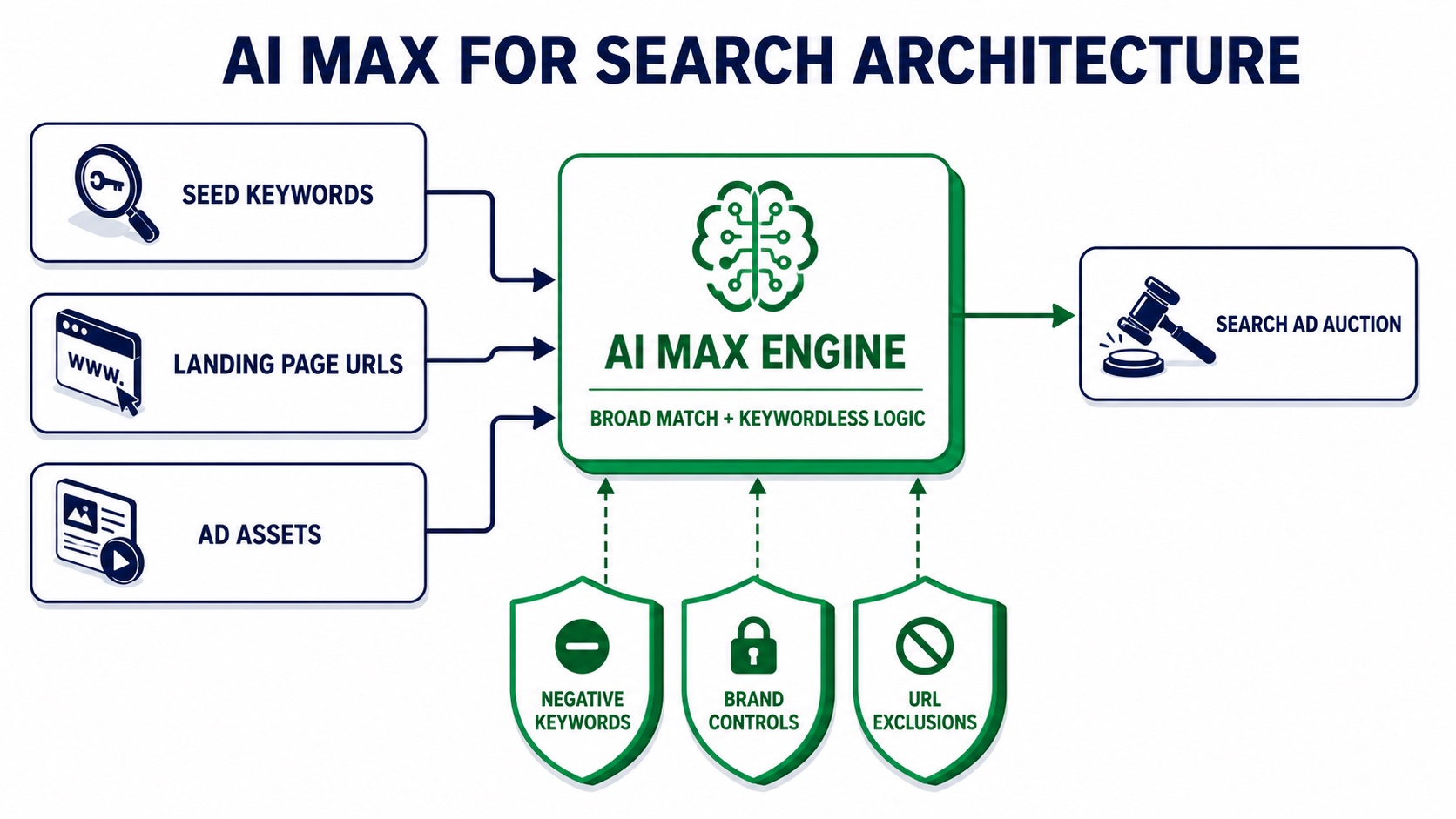
AI Max for Search architecture
AI Max combines advertiser inputs with automated matching and asset optimization, while negatives, brand controls and URL rules remain the practical governance layer.
+-----------------------------------------------------------------------------------+
|                           AI MAX FOR SEARCH ARCHITECTURE                          |
+-----------------------------------------------------------------------------------+
|                                                                                   |
|  INPUT 1: Seed keywords and match types  ---+                                     |
|  INPUT 2: Landing-page content and URLs  ---+-->  [ AI MAX ENGINE ]               |
|  INPUT 3: Ad assets and creative text    ---+      Broad + keywordless logic      |
|                                                       |                           |
+-------------------------------------------------------|---------------------------+
                                                        |
                                                        v
+-----------------------------------------------------------------------------------+
|                            CAMPAIGN CONTROL GUARDRAILS                             |
+-----------------------------------------------------------------------------------+
|  1. NEGATIVE KEYWORDS : Filter low-intent, irrelevant or unsafe queries           |
|  2. BRAND CONTROLS    : Include or exclude defined brand traffic                  |
|  3. URL CONTROLS      : Include eligible pages or exclude unsuitable destinations |
+-----------------------------------------------------------------------------------+
                                                        |
                                                        v
                              [ SEARCH CAMPAIGN DELIVERY ]
                    Google Search surfaces + configured Search Partners
                         Not a cross-channel Performance Max campaign
Read the Source column before judging performance
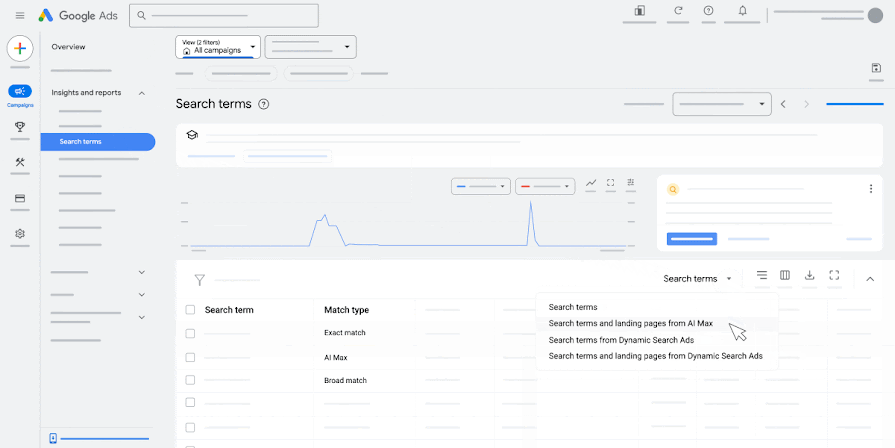
The Search terms report's Source column is the fastest way to separate advertiser-provided keyword delivery from AI Max expansion.
Google instructs advertisers to add the Source column, filter Match type for AI Max, and use the Search terms and landing pages from AI Max view to connect query, headline and destination. The API field is segments.search_term_match_source.
| Reporting signal | What it tells you | Management question |
|---|---|---|
| Keyword | An advertiser-provided keyword participated in matching. | Is that keyword and match type producing the intended intent mix? |
| AI Max expanded matches | AI Max extended a broad-match relationship. | Are the new variants commercially relevant at the current CPA or ROAS? |
| Landing pages and URL inclusions | The query matched outside advertiser-provided keywords through landing-page or asset signals. | Which page, asset or inclusion rule supplied the signal, and did the journey perform? |
| Selected by | Identifies landing pages selected through AI Max. | Are expanded URLs converting, compliant and correctly tracked? |
Evaluate sources separately before making exclusions. A blended campaign CPA can look stable while one expansion source creates low-quality leads, brand cannibalization or landing-page leakage.
Four-step pre-upgrade audit
Complete this audit before the account-specific date in Google Ads—including September 1 if that is the date shown in your notice.
-
Confirm eligibility and capture the baseline
Identify campaigns using ACA/text customization or the campaign-level broad match setting; keep DSA on a separate February 2027 workstream. Record the in-account notice and export current settings, negative lists, brand lists, URL rules, RSA assets and tracking templates.
Save a pre-change baseline by campaign, search term, landing page, CPA, ROAS, conversion rate and downstream lead quality.
-
Lock query and brand boundaries
Consolidate supported account, shared-list, campaign and ad-group negative keywords. Apply appropriate campaign-level brand exclusions and review campaign- or ad-group-level brand inclusions separately.
Block durable business exclusions—not every query with weak short-term performance.
-
Constrain landing-page and creative inputs
Decide explicitly whether Text customization and Final URL expansion should be on. Exclude privacy, legal, careers, support, internal-search, staging, expired, out-of-stock and low-value editorial URLs.
Test
{lpurl}, query parameters, redirects, consent behaviour and analytics attribution against dynamically selected pages. Confirm whether mandatory pinned RSA messaging is compatible with the chosen URL settings. -
Instrument the rollout and define action thresholds
Add Match type, Source, served headline, landing page and Selected by fields to reporting. Segment keywordless and broad-match expansion by spend, conversion quality, CPA or ROAS.
Predefine thresholds for irrelevant-query spend, low-quality leads, unapproved URLs, 404s and policy-sensitive copy. Where available, use an AI Max experiment instead of relying only on before-and-after totals.
Frequently asked questions
AI Max stays within the Search campaign environment, respects negative keywords and has a rolling—not universally fixed—September 2026 migration timeline.
What is the difference between AI Max for Search and Performance Max?
AI Max is an optimization suite inside a Search campaign, while Performance Max is a separate goal-based campaign type that can serve across Google's advertising channels. AI Max preserves Search campaign and ad-group structure while extending query matching, creative and landing-page selection. Performance Max distributes optimization across inventory such as Search, Shopping, YouTube, Display, Discover, Gmail and Maps.
How do negative keywords work in AI Max for Search campaigns?
Existing Search negative keywords continue to be respected when AI Max is enabled. They remain the appropriate control for irrelevant or unsafe query intent, including queries found through broad-match or keywordless expansion. Use campaign-level brand exclusions when the requirement is to suppress a brand and its variants.
Will Google auto-upgrade my Search campaigns to AI Max on September 1?
No universal September 1 cutover is currently documented by Google. As reviewed on August 15, 2026, eligible campaigns using ACA/text customization or the campaign-level broad match setting begin auto-upgrading during September 2026, with the rollout expected to finish by month-end. DSA auto-upgrades begin in February 2027.
If an in-account notice explicitly names September 1 for your customer ID, treat that as an account-specific operational date and preserve a screenshot for the change record. Do not generalize it into a universal platform cutover.
The operational takeaway
Treat the September rollout as a settings-governance event, not as a conversion to Performance Max or the end of keywords.
The immediate work is to verify scope, encode query and brand boundaries, constrain eligible URLs, test tracking and monitor the Source column. AI Max can widen relevant Search reach, but the quality of that expansion will depend on the conversion signals, website content and exclusions your team gives it.
Related reading and tools
The strongest rollout plan connects the September settings change to the separate DSA timeline, query-quality controls and disciplined change measurement.
Primary Sources Checked
The timeline, eligibility, feature mapping, control levels and reporting terminology above are grounded in Google's current announcement and product documentation.
- Google Ads & Commerce Blog — DSA upgrade announcement, updated June 11, 2026
- How AI Max for Search campaigns works
- Set up AI Max for Search campaigns
- About the broad match keywords campaign setting
- About Dynamic Search Ads
- Reporting in AI Max for Search campaigns
- Final URL expansion in Search
- Text customization in Search campaigns
- Frequently asked questions about AI Max
- About the Google Search Network
- About negative keywords in Performance Max
- Apply brand exclusions to Performance Max or Search campaigns
- Google Ads API — AI Max reporting
Reviewed August 15, 2026. Google Ads rollout dates, eligibility and UI labels can change; check the current in-account notice before implementation.
Audit expansion before it becomes budget leakage
Use the Search Terms Waste Analyzer to separate relevant discovery from queries that need a durable negative-keyword control.
Open the Search Terms Waste Analyzer