Short Answer
Ad platform conversions usually do not match GA4 or CRM totals exactly because the systems answer different questions. An ad platform estimates which results it can attribute to ad interactions. GA4 measures site or app behaviour using its configured events, identity, consent, and attribution settings. A CRM records people, companies, lifecycle stages, opportunities, and revenue after operational rules such as deduplication and qualification.
To reconcile the numbers, define one conversion event, align the date basis and time zone, compare attribution windows and eligible interactions, confirm counting and conversion scope, allow for processing lag, test collection and identifier handoffs, and follow individual records into the CRM. An unexplained difference becomes a tracking defect only after expected measurement differences have been removed.
Do not force false agreement
The goal is not to make every dashboard show the same total. The goal is to explain every material difference. A stable, documented gap caused by known attribution rules can be acceptable. A sudden gap after a tag, consent, form, import, or CRM change needs investigation.
What Each Measurement System Is For
| System | Primary job | Why its total can differ |
|---|---|---|
| Google Ads, Meta, or LinkedIn | Attribute outcomes to ad interactions and provide optimization signals. | Click, view, engaged-view, cross-device, modeled, and platform-specific attribution can receive credit. |
| GA4 | Measure website or app events and analyze journeys across eligible channels. | Consent, reporting identity, event configuration, channel eligibility, lookback windows, and property time zone shape reports. |
| CRM | Manage identifiable leads, companies, qualification, opportunities, and revenue. | Duplicate merging, spam rejection, delayed creation, offline intake, stage definitions, and sales operations change the count. |
| Finance or order system | Record completed commercial transactions and recognized value. | Refunds, cancellations, taxes, discounts, currency, fulfilment, and recognition dates differ from attributed conversion value. |
These systems can all be accurate within their definitions while disagreeing with one another. That is why “which number is right?” is usually the wrong opening question. Ask which system is authoritative for the decision: platform data for delivery optimization, GA4 for observed on-site behaviour, CRM for lead progression, and finance for booked commercial outcomes.
Build a Reconciliation Contract Before Comparing
Write the comparison rules at the top of the analysis. If two exports do not share the same event, scope, clock, and unit, a percentage discrepancy is not meaningful.
| Contract field | Decision to document | Example mismatch |
|---|---|---|
| Business event | What real action is being reconciled? | Platform “lead” includes calls while GA4 contains form submissions only. |
| Counting unit | Events, users, leads, orders, opportunities, or value? | Two submissions from one person become two events but one CRM lead. |
| Date basis | Ad interaction date, event date, lead-created date, or stage date? | A July click that converts in August appears in different monthly cohorts. |
| Time zone | Which account or property clock defines a day? | A late-evening conversion lands on adjacent dates. |
| Attribution scope | Which channels and interactions can receive credit? | A platform counts a view-through result that GA4 credits elsewhere. |
| Window and model | How far back can credit travel, and how is it divided? | A longer platform window includes conversions outside the GA4 comparison. |
| Filters and status | Primary, secondary, qualified, valid, test, spam, refund, or duplicate? | CRM removes duplicate and unqualified records that remain platform conversions. |
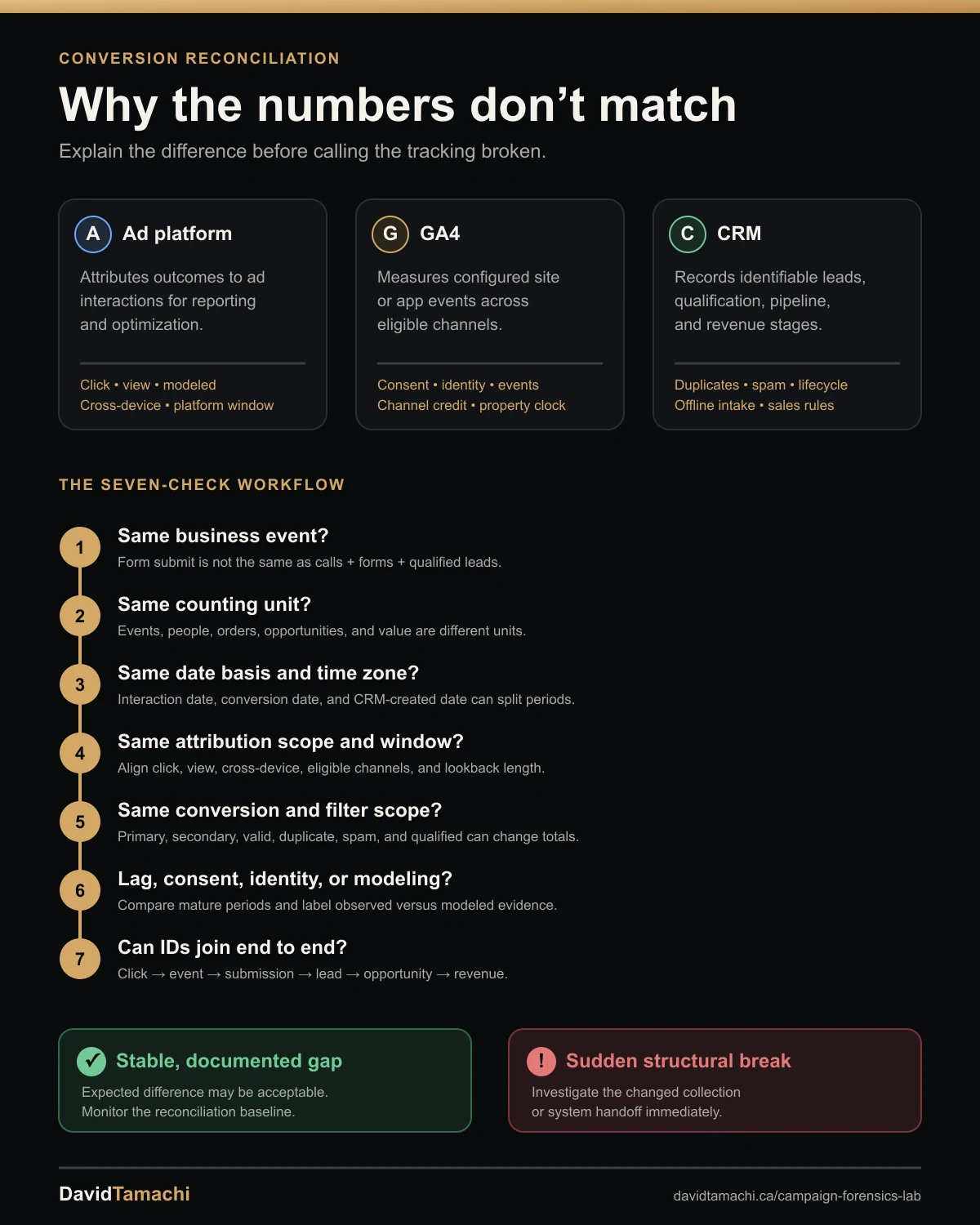
An Eight-Step Conversion Reconciliation Workflow
1. Choose one anchor event
Do not begin with total conversions. Choose one event whose implementation and business meaning can be inspected, such as a completed lead form, booked appointment, purchase, or qualified lead. Record its exact platform conversion action, GA4 event name, CRM creation or stage rule, and any order-system status. If the definitions are not equivalent, fix the comparison before the tracking.
2. Validate collection at the source
Perform a controlled test and confirm what fires in the browser or server, what request is sent, and what identifier is attached. Check tag status, network requests, thank-you page or event rules, consent state, redirects, and cross-domain behaviour. Then verify the event arrives in GA4, the relevant platform diagnostic, and the CRM. A dashboard comparison cannot isolate a tag that never fired from an import that failed later.
3. Align conversion time with interaction time
Platforms may report a conversion against the earlier ad interaction while GA4 or backend reporting uses the time the conversion occurred. Google Ads documents this distinction and provides “by conversion time” columns for comparisons with systems that use the event date. Match the same date basis and time zone before diagnosing day-level or month-end gaps.
4. Align attribution eligibility and windows
Document which click, view, engaged-view, and cross-device interactions can receive credit and how long each remains eligible. Compare the exact conversion window and attribution scope. LinkedIn, for example, distinguishes click and view conversions inside the selected window. GA4 can use different channel-eligibility settings and lookback windows. A platform total can therefore exceed a GA4 paid-channel total without duplicate event firing.
5. Align counting, optimization, and conversion scope
Compare primary and secondary actions, “Conversions” and “All conversions,” one versus every counting, and the event or goal included in each campaign. Confirm whether calls, imports, store visits, qualified leads, or modeled conversions are included. A renamed conversion action can hide a scope change inside a stable dashboard column. Segment by conversion action rather than relying on the blended total.
6. Account for consent, identity, and modeling
Browser and app settings, consent choices, cookie availability, cross-device identity, and reporting identity can change which events and users are observable. GA4 documents that modeled and observed reporting can differ when consent limits identifiers. Ad platforms may also report modeled or cross-device results. Record the consent implementation and data-quality indicators instead of treating every attributed number as a directly observed person.
7. Check lag, imports, retries, and deduplication
Wait until each system’s normal processing and sales-cycle lag has passed. GA4 says processing can take 24 to 48 hours and reports may change during that time. LinkedIn says CSV conversions usually appear within 24 to 48 hours and can sometimes take up to one week. For browser-plus-server implementations, audit event identifiers and deduplication. For offline imports, check upload status, matching, rejection logs, retry behaviour, and whether an update created a second conversion.
8. Trace records through a joinable evidence chain
Create a row-level bridge using privacy-safe identifiers: click ID where available, transaction or order ID, event ID, form submission ID, CRM lead ID, and timestamps. The bridge should show click or impression evidence, site event, lead creation, deduplication result, qualification, opportunity, and revenue. Aggregate totals reveal the size of a gap; joinable records reveal where it begins.
How to Interpret Common Mismatch Patterns
| Observed pattern | More plausible explanation | Next check |
|---|---|---|
| Platform conversions exceed GA4, but CRM lead volume is stable. | Attribution scope, view-through credit, modeling, window length, or GA4 observability. | Separate click and view results; align windows, channels, consent, and conversion time. |
| Platform and GA4 rise together, but CRM leads fall. | Form-to-CRM integration, spam, duplicate merging, field validation, or lead-creation rules. | Trace submission IDs into CRM acceptance and rejection logs. |
| GA4 conversions exceed the ad platform. | GA4 credits other channels, the platform identifier is missing, or the action is not imported or eligible. | Check channel attribution, URL identifiers, account linking, import status, and action scope. |
| CRM leads exceed GA4 and platform conversions. | Offline, direct, organic, referral, call, or untracked form sources contribute leads. | Compare source completeness and preserve “unknown” rather than forcing paid credit. |
| Totals are similar, but daily dates do not line up. | Interaction-date versus conversion-date reporting or a time-zone difference. | Rebuild the comparison using conversion time and one shared time zone. |
| The gap begins immediately after a tag, consent, form, URL, or CRM edit. | A measurement or integration defect is supported. | Test the exact handoff changed, then compare against a stable unaffected event. |
| The recent period is low, but older dates continue to backfill. | Normal reporting, attribution, import, or sales-cycle lag may be incomplete. | Use a maturity cutoff and compare fully developed cohorts. |
How Much Discrepancy Is Acceptable?
There is no universal acceptable percentage. The right tolerance depends on the event, volume, attribution setup, consent environment, and business process. A purchase implementation with stable transaction IDs should reconcile more tightly than a B2B lead program combining view-through attribution, offline qualification, duplicate merging, and a long sales cycle.
Build an account-specific baseline from mature periods. Track both the absolute difference and the reconciliation rate for each handoff: collected site events to accepted CRM records, accepted CRM records to platform uploads, and platform-attributed conversions to observed or qualified outcomes. Alert on a structural break from the baseline, not on an arbitrary internet benchmark.
What to Export
- Ad platforms: daily conversion actions, click and view conversions where available, interaction-date and conversion-date columns, attribution settings, IDs, and upload status.
- GA4: event name, event count, key events, source and medium, campaign, landing page, date, property time zone, reporting identity, and data-quality context.
- CRM: lead or contact ID, created timestamp, source fields, submission or transaction ID, duplicate status, qualification stage, opportunity, revenue, and rejection reason.
- Change log: tags, consent, URL templates, redirects, forms, conversion actions, account links, imports, CRM workflows, and pipeline definitions.
Upload the evidence you have into the Campaign Forensics Lab. The tool places tracking changes beside performance movement, separates platform evidence from downstream outcomes, caps confidence when measurement is contaminated, and creates a brief with contradictory evidence and unresolved questions.
Strong reconciliation conclusion
Finding: most of the mismatch is expected, but a CRM handoff defect is supported after July 18. Expected difference: platform view conversions and interaction-date reporting explain the stable historical gap. Defect evidence: GA4 form completions hold while CRM creation falls immediately after the form workflow changed. Falsifier: submission IDs appear in CRM under a different pipeline. Action: repair the handoff, replay eligible records, and monitor the reconciliation rate.
Common Reconciliation Mistakes
- Comparing blended “Conversions” totals: the columns may contain different actions.
- Comparing clicks with sessions or events with people: the units are not interchangeable.
- Ignoring interaction date versus conversion date: month-end gaps can be reporting allocation, not lost events.
- Assuming the CRM contains all demand: integration failures and operational filters can remove valid submissions.
- Assuming attributed means observed: view-through, cross-device, or modeled results require explicit interpretation.
- Fixing totals without preserving identifiers: aggregate agreement can hide double-counted and missing records.
- Changing tags before reproducing the defect: the original failure path may disappear before it is understood.
FAQ
Why are ad platform conversions higher than GA4?
Ad platforms can include interactions, attribution windows, view-through or cross-device credit, and modeled results that GA4 does not report in the same way. Collection loss, consent, time zones, and conversion-date differences can also contribute.
Which is the source of truth: the ad platform, GA4, or CRM?
Use each for its intended decision. The platform is useful for delivery optimization, GA4 for observed site or app behaviour and cross-channel analysis, the CRM for lead progression, and finance for booked commercial outcomes.
Why can GA4 conversions be higher than the ad platform?
GA4 may credit channels or interactions outside that platform, while the platform may be missing a click identifier, account link, imported action, eligible campaign, consented match, or sufficiently long attribution window.
How should I compare conversion dates across systems?
Choose one date basis and time zone. For event-date comparisons, use platform conversion-time reporting where available, then compare it with the GA4 event timestamp and CRM created timestamp.
Can ad platform, GA4, and CRM conversions ever match exactly?
They can reconcile closely when the event, counting unit, identifiers, date basis, attribution rules, and processing are aligned. Exact equality is not a reliable goal when the systems intentionally use different scopes.
How do I know whether a conversion mismatch is a tracking problem?
A tracking problem is supported when controlled tests fail, identifiers disappear, diagnostics show collection or import errors, or a structural gap begins immediately after a measurement change and cannot be explained by attribution, timing, consent, or CRM rules.
Sources and Method
Reviewed August 3, 2026. Google documents differences between clicks and sessions, interaction-date and conversion-date reporting, auto-tagging, landing-page collection, and account linking in its Google Ads and Analytics discrepancy guidance. GA4 documents attribution channel eligibility, time-zone differences, and conversion-time columns in attribution settings; processing and backfill behaviour in data freshness; and observed versus modeled reporting in consent-mode behavioral modeling. LinkedIn defines click and view conversions, customizable windows, modeled conversions, and CSV timing in its conversion reporting documentation. Meta documents browser and server event deduplication in its Conversions API guidance. The sequence and interpretations above are a cross-system diagnostic framework, not a claim that any platform publishes this exact decision tree.
Continue the Investigation
Use the Campaign Forensics Lab when a tracking change overlaps a performance shift. Start with the cross-channel performance-drop checklist when several platforms move together. If the mismatch is channel-specific, continue with Meta creative-fatigue diagnosis, LinkedIn lead-drop diagnosis, or Google Ads change analysis.